
 Youtube Showcase
 Join our Discord
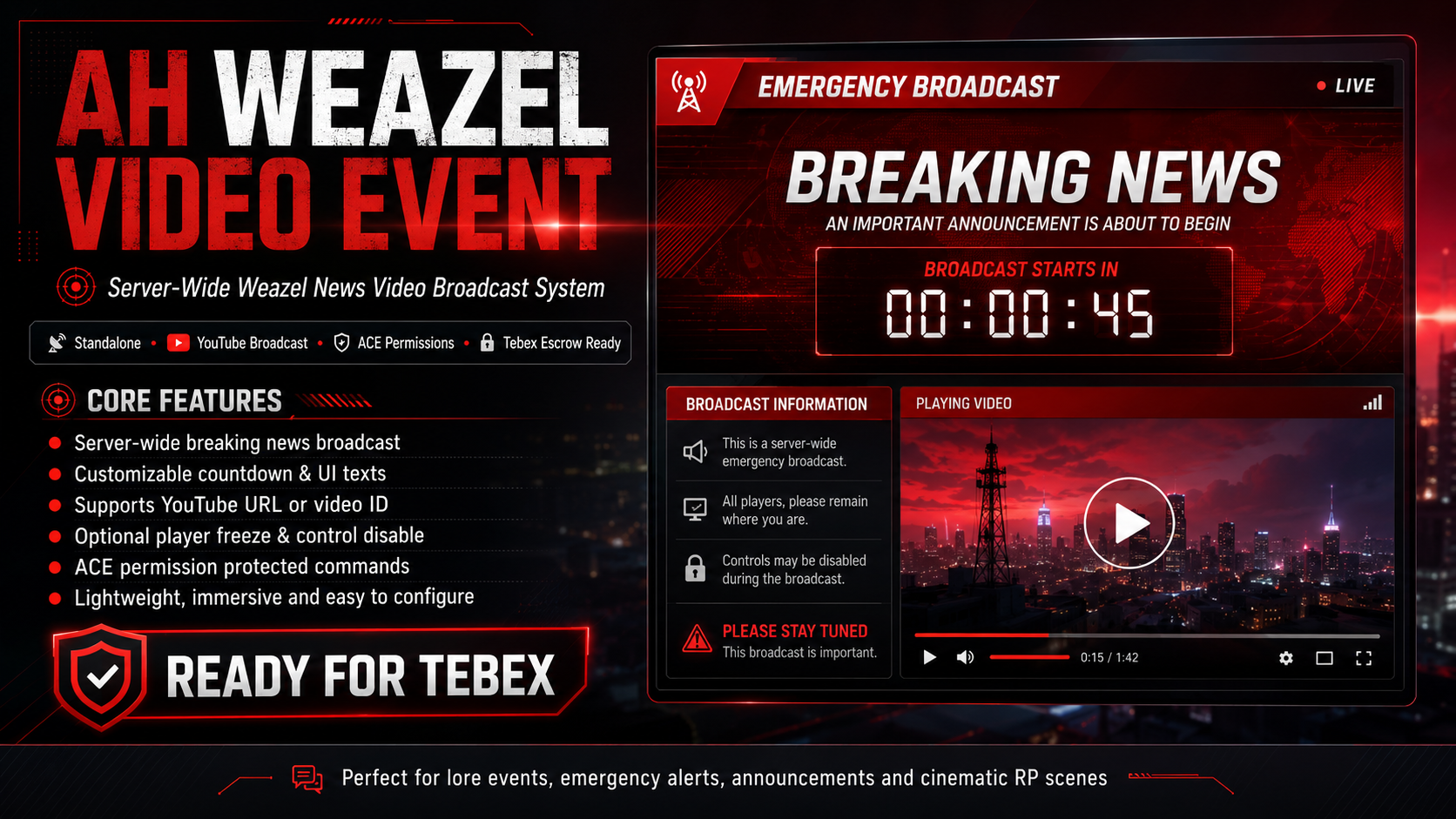
AH WEAZEL VIDEO EVENT — Server-Wide Weazel News Video Broadcast System
Standalone • YouTube Video Broadcast • ACE Permissions • Tebex Escrow Ready
Bring cinematic breaking news, emergency alerts, lore events and immersive server-wide announcements to your FiveM server with AH Weazel Video Event.
This resource allows staff members or authorized job to trigger a full-screen Weazel News broadcast for all players, including a customizable red alert interface, countdown screen and YouTube video display. Perfect for RP news reports, city-wide emergencies, election results, server lore updates, cinematic reveals, event intros and immersive announcements.
The script is lightweight, easy to configure, standalone, and delivered ready for Tebex / Cfx.re Asset Escrow.
SHOWCASE VIDEO
Core Features
Server-Wide Weazel News Broadcast
Trigger a cinematic Weazel News alert for all connected players.
The broadcast includes:
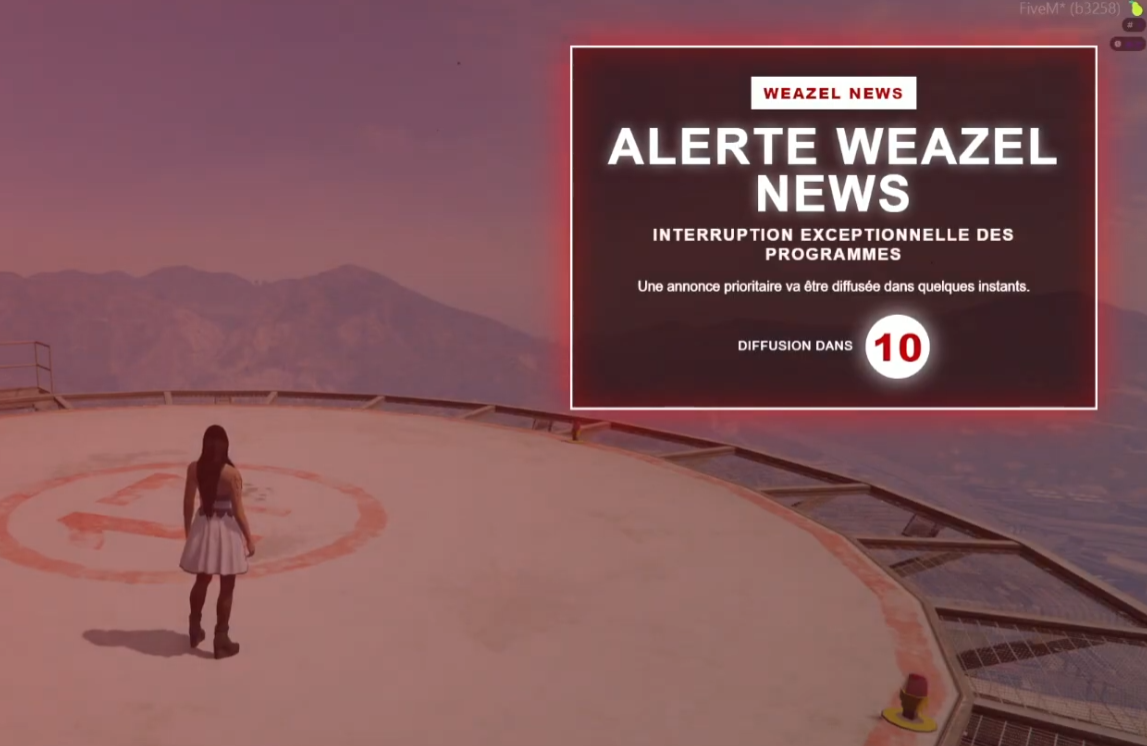
- breaking news alert screen
- countdown before the video starts
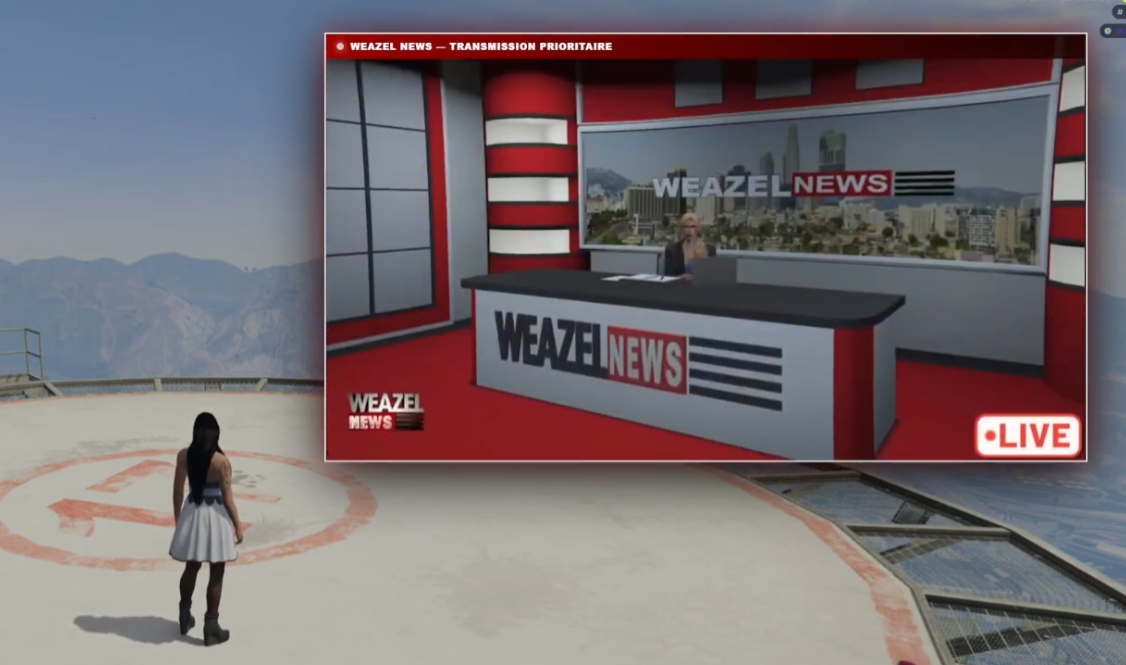
- centered YouTube video display
- automatic close when the video ends
- emergency stop command for staff
Ideal for creating immersive RP moments and important server announcements.
YouTube Video Support
The script supports both full YouTube links and direct video IDs.
Examples:
/weazelvidstart https://www.youtube.com/watch?v=VIDEO_ID
or:
/weazelvidstart VIDEO_ID
You can also configure a default video in the config file and launch it instantly with:
/weazelvidstart
Customizable Countdown System
Before the video starts, players will see a configurable countdown.
You can easily adjust:
- countdown duration
- alert display timing
- video start delay
- safety timeout duration
Perfect for dramatic announcements and cinematic RP scenes.
Fully Customizable Interface Texts
The interface can be customized through language files.
Included languages:
- English
- French
You can customize:
- Weazel logo text
- breaking alert title
- alert subtitle
- alert message
- countdown label
- video header text
- staff command messages
- permission messages
- broadcast start / stop messages
This makes the resource easy to translate and adapt to your server identity.
Locale / Language System
Buyers can change the active language directly in:
config.lua
Example:
Config.Locale = 'en'
To add a new language, simply create a new file inside:
locales/
Example:
locales/es.lua
Then set:
Config.Locale = 'es'
If a translation key is missing, the script automatically falls back to French.
Optional Player Freeze
You can choose whether players should be frozen during the broadcast.
Useful for:
- cinematic scenes
- emergency announcements
- server-wide lore events
- preventing players from moving during important broadcasts
This can be enabled or disabled in the config.
Optional Control Disable
The script can temporarily disable player controls during the event.
This helps keep the broadcast immersive and prevents accidental player actions while the video is displayed.
This option is fully configurable.
ACE Permission Protected Commands
The broadcast command is protected with ACE permissions.
Example:
add_ace group.admin weazelvideo.start allow
This ensures only authorized staff members can start or stop broadcasts.
The command can also be used from the server console.
Safety Timeout
If YouTube does not correctly return the video end event, the script includes a configurable safety timeout.
This prevents the interface from staying stuck on players’ screens.
Commands
Start the broadcast with the default configured video:
/weazelvidstart
Start the broadcast with a specific YouTube video:
/weazelvidstart https://www.youtube.com/watch?v=VIDEO_ID
or:
/weazelvidstart VIDEO_ID
Stop the broadcast for everyone:
/weazelvidstop
In-Game Workflow Example
Staff prepares a lore announcement or emergency broadcast.
A staff member runs:
/weazelvidstart https://www.youtube.com/watch?v=VIDEO_ID
All players receive a Weazel News breaking alert.
A countdown starts on screen.
The YouTube video is displayed to all players.
Once the video ends, the interface closes automatically.
If needed, staff can stop the broadcast manually with:
/weazelvidstop
This creates an immersive, synchronized RP moment for the whole server.
Use Cases
Perfect for:
- Weazel News broadcasts
- breaking news announcements
- server-wide emergency alerts
- police or government announcements
- elections and political events
- cinematic RP scenes
- lore progression
- disasters and city events
- event intros
- trailer reveals
- special server announcements
- RP investigations or public warnings
Compatibility
Frameworks Supported
This resource is standalone.
No framework is required.
It does not require:
ESX
QBCore
ox_core
vRP
any custom framework
The script uses native FiveM events and ACE permissions.
Inventory Compatibility
No inventory system is required.
It does not require:
ox_inventory
qb-inventory
qs-inventory
codem-inventory
any SQL inventory
Database Compatibility
No database is required.
It does not require:
MySQL
oxmysql
ghmattimysql
mysql-async
SQL setup
Requirements
Required:
FiveM server
fxmanifest / cerulean compatible artifact
YouTube access for clients
ACE permissions for staff command access
Recommended:
Recent FiveM artifact
Working NUI / Chromium client environment
Not required:
ESX
QBCore
ox_core
ox_lib
ox_inventory
qb-inventory
qs-inventory
SQL database
Configuration
Main configuration file:
config.lua
You can configure:
- active language
- default YouTube video
- countdown duration
- video width
- safety timeout
- player freeze
- control disabling
- required ACE permission
Language files:
locales/fr.lua
locales/en.lua
Interface files:
html/
The NUI is intentionally left editable so buyers can customize the design, texts and visual identity if needed.
Installation Summary
- Drop the resource folder into your server resources folder.
- Add this to your
server.cfg:
ensure ah_weazel_video_event
- Add the ACE permission:
add_ace group.admin weazelvideo.start allow
- Configure the script in:
config.lua
- Customize the language files if needed:
locales/fr.lua
locales/en.lua
- Restart your server.
Full details are included in the README.
Tebex / Asset Escrow Ready
This resource is delivered structured for Tebex / Cfx.re Asset Escrow.
Protected logic:
client.lua
server.lua
Editable buyer files:
config.lua
locales/*.lua
html/**
README.md
README_TEBEX.md
The NUI files are intentionally kept editable because FiveM Asset Escrow does not protect NUI files in the same way as Lua files. This allows buyers to customize the interface safely.
Upload the ZIP, enable escrow through the official Cfx.re / Tebex workflow, and sell.
Included Files
Included in the package:
client.lua
server.lua
config.lua
fxmanifest.lua
locales/fr.lua
locales/en.lua
html/
README.md
README_TEBEX.md
Support
Full support is available via Discord.
Please read the README before opening a support ticket.
Support includes:
- installation help
- configuration help
- troubleshooting
- bug reports
- update information
Discord: https://discord.gg/6kS659NYfZ
No Refund Policy
No refunds will be issued because this is a digital product with instant download delivery.
If you encounter any issue, support is available through Discord and we will help you resolve it.
Tebex Ready + Licensing
Prepared for Tebex / Cfx.re asset delivery.
Script by: AH Scripts
Do not resell, redistribute, leak, share, modify for resale, or claim this resource as your own without explicit written consent.
Full support is provided via Discord for setup help, troubleshooting and updates.
Discord: https://discord.gg/6kS659NYfZ